
Encoder Overload
Encoder overload affects your stream quality. Please keep attention to stream health indicators. If the “gear” indicator is red, the encoder is overloaded at the moment.

Case 1. One of the video or audio sources is unavailable. It may happen if you plug out the web camera that was used in your scene, or if another app uses it. In this case, the layer or audio device is highlighted light-red.
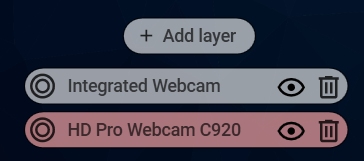
Solution 1. For video devices/layers: ensure the device is available for the app or the data comes from a different source (web page, window, etc.). Or simply remove this layer. For audio devices: make sure that the device is connected, choose a different device, or mute the audio.
Case 2. The quality you set for the video is too high for your CPU.
Solution 2. Try to reduce your processor load with the methods, described inthis article.
If the issue is not resolved, please submit a support ticket.